Hey there! I'm a supplier of Pump Control Panel, and today I'm gonna share with you how to program a pump control panel. Whether you're a DIY enthusiast or a professional in the field, this guide will walk you through the process step by step.
Understanding the Basics
First things first, let's talk about what a pump control panel does. It's essentially the brain of your pumping system. It controls when the pump turns on and off, monitors the pump's performance, and protects it from damage. Before you start programming, you need to have a clear understanding of your pumping system's requirements.
Know Your Pump
Understand the type of pump you're using. Is it a centrifugal pump, a positive displacement pump, or something else? Different pumps have different operating characteristics, and your control panel needs to be programmed accordingly. For example, a centrifugal pump might require different start and stop settings compared to a positive displacement pump.
Determine Your Pumping Requirements
Think about what your pump is supposed to do. Are you pumping water for a residential well, for an industrial process, or for irrigation? The flow rate, pressure, and duty cycle will vary depending on the application. Make sure you know the specific requirements of your pumping system before you start programming.
Getting Familiar with the Control Panel
Once you have a good understanding of your pump and its requirements, it's time to get familiar with the control panel itself.
Read the Manual
This might seem obvious, but it's crucial. The manufacturer's manual will provide you with detailed information about the control panel's features, functions, and programming procedures. Take the time to read through it carefully and make note of any important information.
Identify the Components
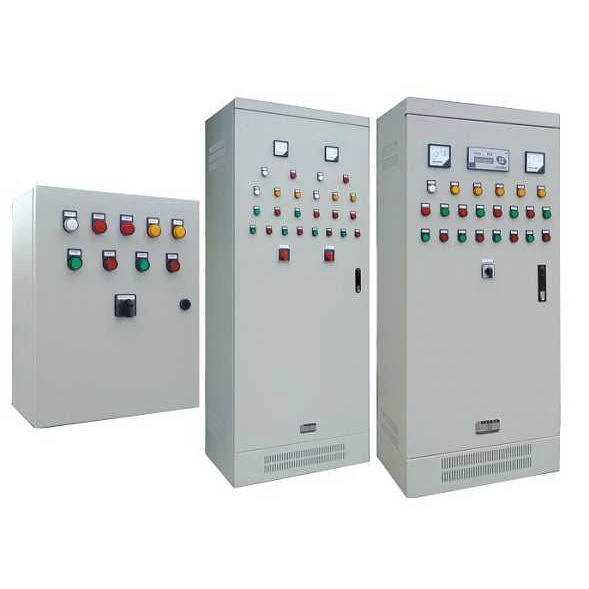
The control panel typically consists of several components, including a controller, relays, switches, and sensors. Identify each component and understand its function. This will make it easier for you to program the control panel and troubleshoot any issues that may arise.
Programming the Control Panel
Now that you have a good understanding of your pump and the control panel, it's time to start programming.
Set the Pump Start and Stop Points
One of the most important settings in the control panel is the pump start and stop points. These points determine when the pump turns on and off based on the water level or pressure in the system. To set these points, you'll need to access the control panel's programming menu and enter the desired values.
Configure the Alarm Settings
The control panel can also be programmed to trigger an alarm if certain conditions are met, such as a low water level or a high pressure. Configure the alarm settings to ensure that you're notified immediately if there's a problem with your pumping system.
Set the Pump Protection Features
Most control panels come with built-in protection features to prevent the pump from damage. These features include overload protection, dry run protection, and overvoltage protection. Set these features according to the manufacturer's recommendations to ensure the longevity of your pump.
Testing and Troubleshooting
Once you've programmed the control panel, it's time to test it and make sure everything is working properly.
Conduct a Test Run
Start the pump and monitor its performance. Check the water level, pressure, and flow rate to make sure they're within the desired range. If you notice any issues, such as the pump not starting or stopping properly, refer to the troubleshooting section in the manual.
Make Adjustments as Needed
Based on the test run results, make any necessary adjustments to the control panel settings. This might involve changing the start and stop points, adjusting the alarm settings, or fine-tuning the pump protection features.
Maintenance and Upkeep
To ensure the long-term performance of your pump control panel, it's important to perform regular maintenance and upkeep.
Keep the Control Panel Clean
Dust and debris can accumulate on the control panel over time, which can affect its performance. Use a clean, dry cloth to wipe down the control panel regularly and keep it free of dirt and dust.
Check the Wiring and Connections
Inspect the wiring and connections in the control panel periodically to make sure they're secure and free of damage. Loose connections or damaged wiring can cause the control panel to malfunction, so it's important to address any issues immediately.
Update the Firmware
Manufacturers often release firmware updates for their control panels to improve performance and add new features. Check the manufacturer's website regularly for firmware updates and install them as needed.
Conclusion
Programming a pump control panel might seem daunting at first, but with a little knowledge and patience, it's a task that you can easily accomplish. By following the steps outlined in this guide, you'll be able to program your control panel to meet the specific requirements of your pumping system and ensure its reliable operation.
If you're interested in purchasing a Pump Control Panel or have any questions about programming or maintenance, feel free to reach out. We're here to help you find the right solution for your needs and ensure that your pumping system runs smoothly.
References
- Manufacturer's manual for the pump control panel
- Industry standards and best practices for pump control panel programming and maintenance